Hi!
For the past few years, I have been working on private electronic projects. With growing knowledge from books and university, the concepts become increasingly complex - I need a way to cleanly document my process of making:
This is what I developed! (click to zoom)
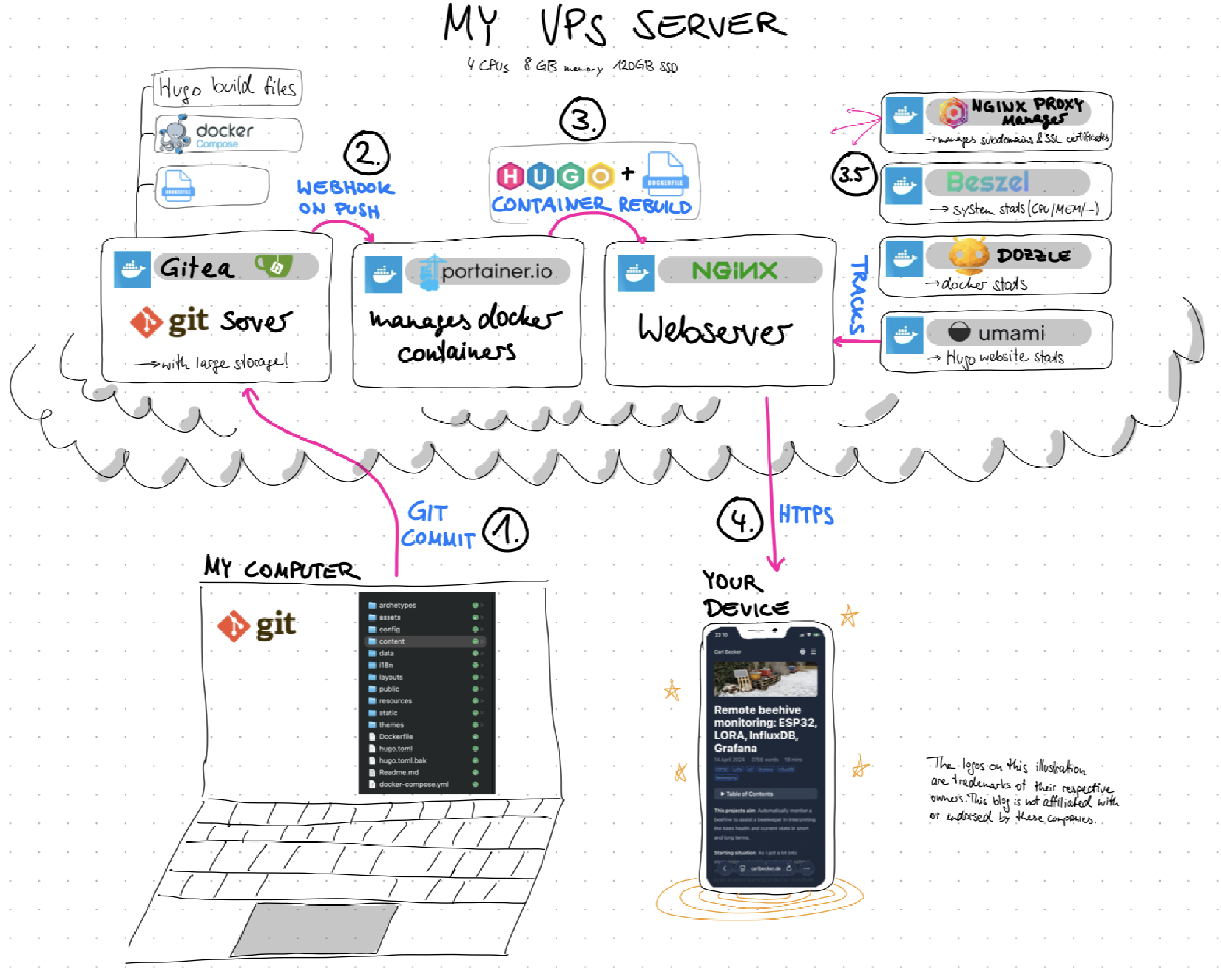
My requirements of a blogging system #
- Low effort to write and publish - otherwise I won’t write
- Runs on already rented VPS server to avoid additional cost & reuse domain
- Lightweight and fast
Hugo as the core system #
The core system is a static site generator called Hugo framework. It’s lightweight and generates fast and sleek websites. The visuals can be customized with a plethora of themes (This blog uses the blowfish theme).
- Write articles in Markdown format
- Preview website locally
- Execute
hugo serverin CLI - Access web page under
http://localhost:1313
- Execute
- Deploy using Nginx Webserver.
Pro #
- You are in control (you build and serve the website yourself)
- Markdown is used
- The whole website is a “simple” folder
- Use your own editor to write Markdown
Con #
- no on-website article editor for quick changes
- pretty involved workflow, you will definitely need some hours to get up and running (I needed around 20-30 hours)
1. Step: Own Git server (using gitea) #
To get the blog website, a bunch of build files collected in a directory is needed. The directory contains:
- Articles in Markdown format
- Images
- Configuration files in TOML format
- Themes
- Dockerfile and docker-compose.yml
In addition, git adds versioning of your articles.
Now one could ask: Why do you need an OWN Git server? Because you need to store the photos somewhere! My blog, starting with two articles is already 350 MB in size!
2. Step: Webhook on Push #
When committing a new article or change to my repo, I want the website to update. So I set up that a git push command will tell my portainer service!
3. Step: Container rebuild #
Portainer is a service that manages docker containers. When a notification from git arrives, it pulls the repo and sets up a new nginx webserver:
Dockerfile
# 1. Get requirements
FROM hugomods/hugo:exts AS builder

# 2. Prepare workspace
WORKDIR /src
COPY . .

# 3. Clean up any broken submodule leftovers and clone fresh
RUN rm -rf themes/blowfish && \
    git clone --depth=1 https://github.com/nunocoracao/blowfish.git themes/blowfish

# 4. Build the site (Using -D for drafts and --gc for cleanup)
RUN hugo -D --gc

# 5: Serve the site with Nginx
FROM nginx:alpine
RUN rm -rf /usr/share/nginx/html/*
COPY --from=builder /src/public /usr/share/nginx/html
EXPOSE 80
docker-compose.yml for setting up the docker container stack
version: '3'

services:
  blog:
    build: .
    restart: always
    networks:
      - docker_website_network    # Join the specific network

networks:
  docker_website_network:
    external: true    # 'external' means "use the existing network, don't create a new one"
3.5 Step: SSL & Monitoring #
For management of domains and subdomains, I set up the NGINX reverse proxy. It also helps manage certificates so that one can access the website via HTTPS.
Additionally, I want to know about how well my website performs! I chose Beszel, Dozzle and Umami to give me system stats, docker stats and website visitor stats. These services have their own dashboard which I locked away. Setting these up took me half a day.
4. Step: HTTPS #
You can access the website! The website is simple, static, and loads fast.
Challenges #
There were some significant challenges and questions to get this blog and running!
-
Before thinking about file storage size, I used a public git provider - however, they don’t allow much storage per repository - so I decided to spin up my own Gitea instance.
-
Gemini told me to use the LFS feature in git to more efficiently store images in repos. However, after I moved to my own git instance, I wanted to deactivate LFS for simplicity - this turned out to be NOT easy.
-
The CI/CD pipeline takes some time to get up. The webhook in step 2 is easy, but the automatic container build is not - also, if the container setup fails, you mostly get only error numbers, no detailed error logs.
-
Hugo recommends adding themes as git submodule. This turned out to be not compatible with the automatic build process of portainer
-
Use real name or pseudonym? At the end, I thought a real name would be cooler.
Hardware needed #
This website is served using the lowest tier model of a rented Linux VPS (virtual private server) at 1blu.de:
- 4 CPU cores
- 8 GB Ram
- 120 GB SSD
A VPS server means, that the resources are shared, but SSH and root access is provided. In my experience, this hardware tier model is enough to run a Minecraft server with at least 8 players, and an InfluxDB and Grafana dashboard service for my beehive monitoring too.
How to publish using my workflow #
- Edit the local Hugo project by adding new article in Markdown
- Preview your articles locally in your browser
- Push changes to online git repo
- Wait for automatic update (around 30 seconds)
- My Git service informs the portainer docker container on my vps server
- Portainer pulls my git repo and rebuilds the whole stack
- The new stack contains only a simple nginx container with the new static website
- You can access the new article.
Conclusion: Should you also choose Hugo? #
So if you are into DIY-server-management tasks, this is definitely for you. I don’t have any long-term experience with it yet, but I assume, it won’t be that maintenance-heavy. Since I already write a lot of notes with markdown and use git nonetheless, the workflow won’t be a problem for me.
But if you are not into these tasks, you should definitely choose a simpler alternative that doesn’t take so long to get up and running - in my case it took like 3 holidays in between university lectures! Maybe, there are services on the internet that manage hugo for you?
So let’s see - if there are more articles popping up, then this system works xD
I am interested in your thoughts! - Reply with a simple Email
Have a nice day,
Carl