Hi!
My blog is still in its starting blocks. I already put some effort into it and before telling more people about the articles, some proper analytics tools would be nice. I previously set up Umami and Goaccess, but was not really happy, so the next tool to try is Plausible! The following article is about what I use Plausible for, how it’s set up in my server architecture, also you can see the final live analytics page and we discuss the privacy policy text.
How this blog is set up #
I already described this in this article in full length, but in short: All my public services run on a rented virtual private linux server (VPS) with an Ubuntu server distro which I have access to via SSH. All services are hosted with docker: Minecraft server, todo-list management system, a git instance and this hugo blog you are visiting right now. Since I am a little lazy at CLI, I use portainer, a webservice to manage my docker infrastructure (it is a docker service itself).
Hugo Intro
Hugo is a framework that lets you write blog articles using Markdown. The Markdown files live together with the development files and the theme inside a folder you sync with a git repo. On every git repo update, git is configured to send a webhook to my docker management tool to rebuild the website – so the website automatically gets updated. An important thing: The resulting website is static, meaning no database with user management, comment section etc. exists.
Interesting metrics #
I feel like some articles are worth sharing with a wider audience than my friends, so in the future, I want to share my URL more publicly etc. Maybe, it becomes a basis for a future career option! So I want to track a little bit how well my blog performs!
I don’t have any experience on that, but some articles on the internet provided inspiration on interesting metrics:
- Number of Pageviews: How many visitors on each website
- Number of Unique visitors
- from which country
- from which device (mobile / desktop or browser)
- Sources where visitors come from
- by directly entering the blog url in search bar
- by finding blog in search engines
- by coming from other platforms like my LinkedIn description or GitHub
- Time on each post page
- Maybe article progress, how far they scrolled
- “Bounce rate” (Proportion of visitors leaving website after looking at one page)
- People who start videos / use widgets inside blog articles
- SEO keyword rankings
- Backlinks: Number and quality of other websites linking to my blog
Tradeoffs
I am myself a privacy-oriented user – I use Linux Mint with Firefox with uBlock Origin. I find it important not to surveil my visitors or find out who they are. Thus, I avoid Google Analytics, a US company maybe also having insight in my website metrics and probably selling it. Also, monitoring solutions without cookies can’t identify users over multiple browser sessions. But that’s ok.
First tries in monitoring #
1. Umami
Umami is a service that monitors the website with a script in the <head> part of the website that the visitors execute automatically. If you are using hugo, you need to put it into the theme’s configuration. As all the other monitoring solutions, it was self-hosted using docker, but I was not very happy with the user interface and the metrics it provided.
2. Goaccess
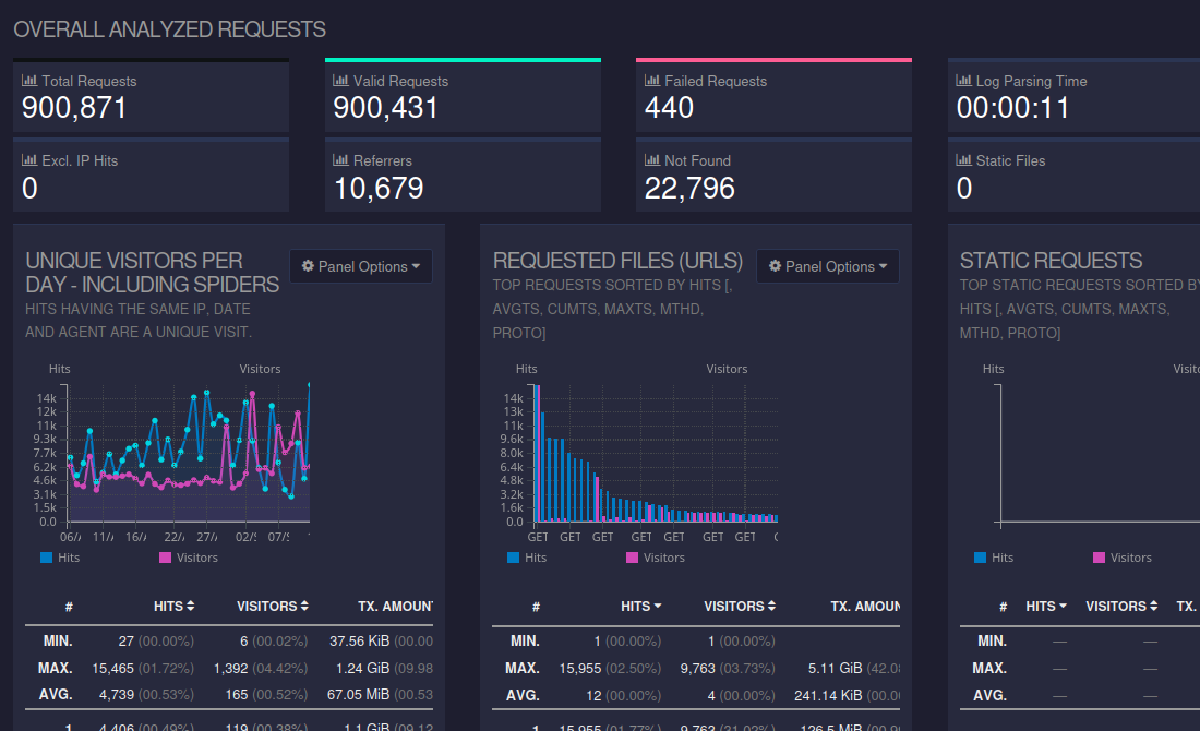
Goaccess is another website-monitoring service that just automatically analyzes the logs of my nginx reverse proxy without the need of the visitor to execute a script. It’s quick to set up and tracks all services managed with the reverse proxy automatically:

Although its design is fancy and the dashboard is filled with metrics right out of the box, I found it somewhat overwhelming, also it seems difficult to distinguish between bots/crawlers and proper users. Maybe it’s customizable, but I am too lazy for that.
Upgrade: Using Plausible #
Plausible is an analytics tool developed by a company making its money by hosting the software on their servers. However, there is a free, self-hostable community edition – it is pretty similar to Umami. I decided to make my live Plausible analytics page public:
Plausible · carlbecker.de
Plausible is a lightweight and open-source web analytics tool. Your website data is 100% yours and the privacy of your visitors is respected.
Like Umami, it doesn’t have any cookies, but requires the visitors to execute a script – Actually, I encourage you to find it by opening the F12-browser-menu and searching for “plausible” in the raw HTML. If you execute this, you’ll see an increase in the analytics!

In my case, I needed to deactivate my uBlock Origin browser extension. Also, since I don’t have that many visitors yet, my own page visits play a role in the metrics, so I excluded my own IP address from my metrics.
So – what metrics does it provide:
- Number of Pageviews Check!
- Number of Unique visitors Check!
- from which country Check!
- from which device (mobile / desktop or browser) Check!
- Sources where visitors come from Check!
- by directly entering the blog url in search bar Check!
- by finding blog in search engines Check!
- by coming from other platforms like my LinkedIn description or GitHub Check!
- Time on each post page Check!
- Maybe article progress, how far they scrolled Check!
- “Bounce rate” (Proportion of visitors leaving website after looking at one page) Check!
But some are not checked:
- People who start videos / use widgets inside blog articles No Check! (however my video delivery service rented att bunny.net already tracks the video views)
- SEO keyword rankings No Check! (don’t really know what this is all about if I am honest)
- Backlinks: Number and quality of other websites linking to my blog Kinda check! (I can get to know about these websites if people click there on my link).
About the Privacy note #
I want to run a proper website and inform you what data I process about you – so I wrote a privacy policy too, inspired by related websites and polished with LLMs.
Conclusion #
Let’s take a look on how well the service fits the need! I hoped I could inspire you on what monitoring solutions are currently out there and how you could set up these too. If you want to dive in, just grab their official documentation or ask your favorite LLM to guide you through the docker-compose files.
I am interested in your thoughts! – Reply with a simple Email
Have a nice day,
Carl